Eclipse hangs on startup

Having love for Eclipse is one of the traits of Java Developers and just like any other software this gives problems too.

Sometimes, Eclipse just hangs up on the startup. When you try to click anywhere on it, the cursor turns busy and never gets the control back.

A simple fix for this problem is as follows.

  1. Kill the hung eclipse.
  2. Go to {workspace_loc}\.metadata\.plugins
  3. Rename the folder org.eclipse.core.resources to org.eclipse.core.resources.old
  4. Now open up the eclipse. When it opens, you will that all the files that are open in the editor will error out. That is normal.
  5. Close all files in the editor.
  6. Close eclipse.
  7. You will find a new org.eclipse.core.resources folder. Go ahead and delete this.
  8. Rename org.eclipse.core.resources.old to org.eclipse.core.resources
  9. Restart eclipse.
  10. Bingo.

Eclipse doesn’t load/can’t open

Sometimes Eclipse, the IDE doesn’t open and you realize that usually after about 10 minutes. Although there are many reasons for this, there is a common solution. Try it and hope it works.

Here are the steps to solve this problem.

  • Go to your workspace location on your machine.
  • Go into .metadata –> .plugins –> org.eclipse.core.resources.
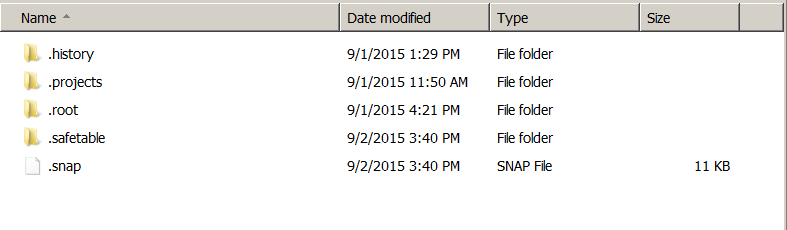
  • In this folder, you might find a .snap file as shown below

.snap

  • Delete this .snap file.
  • Restart your eclipse and it should start immediately.

File Processing in Apache Camel

Let me begin with this statement: “Camel is very powerful and very flexible.” Having said that, I believe I am not there yet or Camel is not there yet. Although myself and Camel are not in superb terms with each other, I started to fall in love with it. Lets look at its File Processing Capabilities.Keep looking at this post for updates.

As mentioned in my earlier post, it is very easy to create a file poller over a location. The syntax is

<camel:from uri=”file:src/data?noop=true”/>

It is this one line when put in a route will start polling the folder and will keep on executing the route for each file found in the location.

Here are a few snippets I have found useful regards to this file processing.

1. Get the name of the current file that is being processed.

${in.header.CamelFileName}

But this has to be handled in a language like simple. For example,I wanted to get control over the file name and detect if the file name contained some text, so I used,

<choice>
<when>
<simple>${in.header.CamelFileName} contains “Auto”</simple>

<!– Do something here –>

</choice>

Getting started with Apache Camel. Step by step Instructions.

To my surprise, Apache Camel is very easy to setup. I will give a try on setting it up on my eclipse but this way is even more easier.

Follow these steps:

  • There is an IDE called as Fuse IDE (which is actually built on eclipse). Go ahead and download it from here.
  • Also install maven and set it up.
  • You have installed Apache Camel. But lets test a little project on it.
  • Open the IDE and click on File > New > Fuse Project.
  • Select Use default Workspace Location. Click Next
  • Now you will have a bunch of options. Select camel-archtype-spring as shown below.
  • camel
  • Give the name of your project as Artifact ID. Click Finish.
  • You are done. This will come up with an example mentioned in my first post.
  • Go to src/main/resources > META-INF > spring and open camel-context.xml.
  • Right click on the file in the editor and click Run As> Local Camel Context.
  • Bingo, you have installed Camel, set it up and executed a project.

Using a properties file in Camel

As mentioned in the documentation, there are two ways a properties file could be mentioned in Spring DSL.

Way 1:
The properties file must be saved in src/main/resources folder.

CamelContext.xml
<bean class="org.apache.camel.component.properties.PropertiesComponent" >
<property name="location">
<value>sql.properties</value>
</property>
</bean>

<camel:context .....>
<camel:route... >
...

<camel:log message="${properties:sql.properties:select}"></camel:log>

<camel:route>
</camel:context>

Way 2:
Instead of defining in the beans, you could define the properties file in the context itself.

<camel:context .....>

<propertyPlaceholder id="properties" location="sql.properties"/>

<camel:route... >
...

<camel:log message="${properties:sql.properties:select}"></camel:log>

<camel:route>

</camel:context>

Sending parameters from Camel to bean. Using setproperty.

Camel Exchange is a message container. Which means simply that Exchange is a object.
Using this object data could be transferred from camel to a bean.
Since we are using Spring DSL ( I know most of the springers, already understood where this is going), we will make use of property tags.

Spring allows us to set property tags in xml and use them in java. Camel supports that. Simply put, lets dive into the code.

CamelContext.xml

<bean id="UIBkend" class="com..main.UIBkend">
</bean>
<camel:context>
<camel:route>
<camel:from uri="file:src/data?noop=true">

<camel:setProperty propertyName="PROP1">
<simple>CAKEC</simple>
</camel:setProperty>
<camel:to uri="bean:UIBkend" />
</camel:context>

UIBkend.java

public class GcasUIBkend implements Processor{
@SuppressWarnings("unchecked")
@Override
public void process(Exchange exchange) throws Exception {

String name = (String) exchange.getProperty("PROP1");

System.out.println("Hello. "+ name);

}

}

Processing a java class from camel

In my last post I have showed you guys to send the control from camel to a java class but I did not show you how to manage the java class.
In my previous post, my camel is going to a class UIBkend.
Recap.

My code is:

<bean id="UIBkend" class="com.main.UIBkend">
</bean>
<camel:context>
<camel:route>
<camel:from uri="file:src/data?noop=true">
<camel:to uri="bean:UIBkend" />
</camel:context>

As you can see I did not mention any method name in the class. So the control must be going to some method. That method is called as the process. This method is coming from an Camel Interface called as Processor. When you implement this interface you are supposed to write logic to this method process,  and this process takes Exchange as its input parameter.

Exchange is a camel message container. Basically what that means is, it is an object that holds all the camel information from the camel to the Java. If you are wondering if you could use this Exchange in someway to get some data from Camel to Java, then you are on right track. That will be my next post. Until then, my java code looks like.

public class UIBkend implements Processor{
@SuppressWarnings("unchecked")
@Override
public void process(Exchange exchange) throws Exception {
System.out.println("Saying hello from Java class.Camel routed me here.");
}
}

Forwarding the camel route to a java class aka bean

As I mentioned in the earlier post, I am working with Camel and Spring. So I will show you how to get the control from Camel to a Bean ( Java class).

In my last post,  I have mentioned that Camel deals with Routes. And I still did not graduate to next level. To get to the bean I must have a from right. That from must be instigated by camel. For my testing purposes, I have used the same file location as from.

So my code looks like.


<camel:route>
<camel:from uri="file:src/data?noop=true">
<camel:to uri="bean:UIBkend" />

To get this working. You have to(absolutely have to) define your bean. If you know spring, then you already know what am talking about.
So now my code will look like.

<bean id="UIBkend" class="com..main.UIBkend">
</bean>
<camel:context>
<camel:route>
<camel:from uri="file:src/data?noop=true">
<camel:to uri="bean:UIBkend" />
</camel:context>


Thats it. When you run the camel context, for a presence of every file in that location, the java class is called.

Apache Camel. Simple, powerful and extremely confusing

I have started getting my hands wet with Apache Camel and since it was for work, I had to jump right into the sea and collect as many shells as possible. This is a reference for myself and for people who are struggling with Camel. If anybody could throw some valuable comments, that will be much appreciated. After all sharing is gaining.

So this is the bare basics of Apache camel and I would like to post all the details about getting started on Camel.

Camel as the documentation says, empowers the developers to define the routing and mediation rules. For a newbie like myself, the first few words in the sentence confuse me enough to back out. Camel is simply a tool to define the routes. Routes,meaning your source and destination definitions. For now lets keep this simple and dive right in. ( I am sure Camel is much more than this)

Reading the sample of Camel in Action Chapter 1 helped a lot but I have to say Camel is much more simpler than that.

I am using Spring so will be using Spring DSL configuration.

Let us imagine a situation where you have to process some files and write the output into another file. Using normal Java, we would have to handle the file procurement, closing open of source and destination files etc. But in camel, you can just configure it in a couple of seconds.

I will not go into the details of installing Camel and setting it up in this blog ( may be later) but assuming you have done all that, all you need is a xml configuration.Let me first show the code and explain you step by step.

(Readers. Please pardon me. XML tagging is not functioning properly in wordpress. Please dont mind the color coding too.Will figure out soon. Meanwhile….)

<?xml version="1.0" encoding="UTF-8"?>
<!-- Configures the Camel Context-->

<beans xmlns=”http://www.springframework.org/schema/beans&#8221;
xmlns:xsi=”http://www.w3.org/2001/XMLSchema-instance&#8221;
xmlns:camel=”http://camel.apache.org/schema/spring&#8221;
xsi:schemaLocation=”http://www.springframework.org/schema/beans http://www.springframework.org/schema/beans/spring-beans.xsd
http://camel.apache.org/schema/spring http://camel.apache.org/schema/spring/camel-spring.xsd”&gt;

<bean class=”org.springframework.beans.factory.config.PropertyPlaceholderConfigurer”/>

<camelContext xmlns=”http://camel.apache.org/schema/spring”><camel:route&gt;
<camel:from uri=”file:src/data?noop=true”/>
<camel:choice>
<camel:when>
<camel:xpath>/person/city = ‘London'</camel:xpath>
<camel:log message=”UK message”/>
<camel:to uri=”file:target/messages/uk”/>
</camel:when>
<camel:otherwise>
<camel:log message=”Other message”/>
<camel:to uri=”file:target/messages/others”/>
</camel:otherwise>
</camel:choice>
</camel:route>

</camelContext>
</beans>
So as you can see, above is the xml configuration of camel. Camel (not only in xml but in any other DSL) works on basis of a context. This context is called Camel Context.

Since we are dealing with Spring in this example, the xml began with the bean definitions for spring and camel.

As I mentioned earlier, Camel deals with routing. ( and hence the tag <camel:route>).

The problem I am dealing with is some kind of a file processing. So to let camel know that our starting point is a file we said.

<camel:from uri=”file:src/data?noop=true”/>

from – This denotes the starting point

uri –  The from function will start from the defined uri.

file – what is that we are processing. File is the type. Yes Camel has several such definitions where you just mention the keyword and the clever camel will know what to do.

: – colon is the delimiter for the keyword from. From this point on we will mention the path.

src/data – the file path

? – Delimiter for the conditions just like in a url.

noop=true – This is an camel option. Which here means, do not delete after reading the file.

The above line meant, “Oh clever camel, please read a file from src/data location and dont delete it after reading it”.

<camel:choice> – conditional statement prefix. To mention a conditional statement, we have mention this prefix.

<camel:when> – conditional  statement.(if)

<camel:otherwise. – conditional  statement.(else)

<camel:xpath> – camel supports xpath ( XML Path Language). Don’t be intimidated by this. The line <camel:xpath>/person/city = ‘London'</camel:xpath> means, in a person tag if the city tag value is ‘London’


<person ....(blah blah)>

<tag1> (blah blah) </tag1>

<tag2> (blah blah)</tag2>

<tag3> (blah blah)</tag3>

<city>London</city>

<tagY> (blah blah)<tagY>

<tagX> (blah blah)</tagX>

<tagN> (blah blah)</tagN>

</person>

If such a condition exists, then process this <camel:log message="UK message"/> (which means, log the message, where and how depends on your logger settings. You can use log4j. Just set log4j properties and it will automatically wire it) and this
<camel:to uri="file:target/messages/uk"/> (this means , move the file to target/messages/uk path).

Very simple. Huh! Yes it is. Just be defining an xml file with a source folder and a target folder and a very simple condition, the files are processed and moved into respective locations. No file handling mess and no boiler plate coding.


A few things to notice is,

  • Camel also processes line by line.
  • Camel has no boiler plate code whatsoever. But if you still prefer and are extremely comfortable in other languages like Java(like me), OGNL and many others, you can easily extend this amazing functionality in language of your choice. (.NETters, I think… I think camel doesnt work for you but if I am wrong, I am happy for you. )
  • There is quite a bit of syntax to learn, probably not a bad thing at all, since google tells us everything.
  • Documentation is poor. As camel can extend in several languages, there is no proper documentation for any language. I am struggling myself and praying my boss gives me ample time when he gives me work on Camel but I should confess, I am loving this power. Feels like riding a S1000RR.

So this is the first post people.  I will probably come up with setting up camel pretty soon but before that post hits up, I am gonna write other camel examples as my work demands. Happy cameling.

Camel noobs and experts. Please comment and share your thoughts and camel tips.